

Best React Data Grid for Performance in 2026
Comparing the Performance of Top React Data Grids
RoarLyte - 14 June 2026 (10min)
Why Grid Performance Matters
If you’re comparing enterprise-level data grids for your React application, performance should be your top consideration.
In data-intensive applications, data grids are becoming vitally important for helping users visualize, manage, and analyze large datasets. Performance becomes even more critical when applications update or stream large volumes of data in real time and users expect immediate responsiveness.
Most teams discover grid performance limitations only after their data has scaled and app complexity has increased. That’s when scrolling becomes less responsive, memory usage rises, and update operations become expensive.
The inevitable consequence of poorly performing data grids is a drop-off in user adoption and developers spending hours trying to optimize grid behavior instead of building product features.
Choosing a non-performant grid is a costly, time-consuming mistake.
Benchmarking Rationale
There is a surprising shortage of head-to-head performance benchmarks for React data grids. Many existing comparisons use narrow test scenarios or lack statistical rigor to account for anomalies.
To help teams evaluate grid performance, we have built a benchmarking suite that compares the performance of popular data grids on common data-intensive workloads. These workloads include scrolling, sorting, filtering, dataset updates, and pinned rows and columns.
All tests, configurations, benchmark implementations, and reproduction instructions are publicly available in this GitHub Repository. Developers can run the benchmarks, inspect the test setup, and independently evaluate the results.
This article presents the performance metrics measured in our testing environment. While the results show how each grid performed, we encourage readers to reproduce the benchmarks and draw their own conclusions.
Small datasets rarely reveal any meaningful performance differences. The aim of these benchmarks is to evaluate applications in which large datasets and frequent updates are core requirements rather than edge cases.
Several performance tests use hundreds of thousands to a million rows. Although these workloads may surpass the requirements of many applications, they reveal how grid architectures perform under stress and help identify performance bottlenecks.
The benchmarks focus specifically on rendering and interaction performance under comparable conditions, using tests designed to measure how performance changes with scale.
Libraries and Configurations
This benchmark compares the performance of 6 popular data grid solutions.
| Grid | Packages | Version |
|---|---|---|
| LyteNyte Grid | @1771technologies/lytenyte-core | ^2.1.1 |
| AG Grid | ag-grid-community, ag-grid-react | ^35.3.0 |
| MUI X Data Grid | @mui/x-data-grid-premium | ^9.3.0 |
| DevExtreme | devextreme, devextreme-react | ^25.2.7 |
| Handsontable | handsontable, @handsontable/react-wrapper | ^17.1.0 |
| Material React Table | material-react-table | ^3.2.1 |
Apart from LyteNyte Grid, the remaining grids were selected based on their monthly npm downloads, with the top 5 by download count selected.
Library Selection Considerations
To make an apples-to-apples comparison, we’ve included only React data grid libraries with built-in virtualization.
LyteNyte Grid Core and AG Grid Community were tested. Both libraries offer paid versions. However, we selected the open-source versions of each library because they use the same rendering engine as their respective paid versions.
MUI X Data Grid Premium was selected instead of MUI’s open-source data grid because the open-source version lacks the virtualization capabilities required for these tests.
We excluded TanStack Table because it’s a headless table, so its performance depends on the virtualization layer built on top of it. Instead, we tested Material React Table as an imperfect proxy, given that it’s a popular React grid built on top of TanStack.
Another notable exclusion is Glide Data Grid. Glide renders with a canvas rather than the DOM, making it difficult to compare directly with DOM-based grids.
Configurations Considerations
Each grid was configured using recommended performance-oriented settings where available. At a high level, this includes configurations such as:
- Enabling row and column virtualization.
- Setting overscan or buffer to 0.
- Disabling animations.
- Disabling pagination and toolbars.
- Disabling resizing and reordering.
Note
Handsontable’s native data model is a 2D array: Array<Array<number>>. The other grids use an array of
objects with named keys: Array<Record<string, number>>. All Handsontable tests use this format, which is the
correct idiomatic input for the library and avoids any overhead from an incompatible data shape.
For a more detailed breakdown of configurations, refer to the Fairness and Grid Normalization section of the GitHub README.
Methodology, Environment, & Reliability
To achieve a fair and consistent comparison, all benchmarks were executed on the same hardware and software configuration.
System Configuration
| Machine | MacBook Air |
| System Chip | Apple M4 |
| CPU | 10 Cores (4 performance and 6 efficiency |
| Memory | 16 GB LPDDR5 |
| Storage | 250GB APFS on internal SSD |
| OS | macOS Sequoia v15.7.3 |
| Browser | Chrome v149 |
| Display | Dell U4021QW 39.5 Inch (5120x2160) @ 60hz |
Benchmark Testing Methodology
Benchmarks were run using Measure Right, a benchmarking library built on top of Playwright.
Measure Right launches the system-installed version of Google Chrome and runs each test in a headed Chrome instance. This keeps the full GPU compositing pipeline active and ensures the benchmarks reflect realistic rendering conditions.
Scroll-based tests use a global Scroll helper defined inline in each test page’s HTML file. The helper calls the
browser’s native scrollBy method in fixed 500px increments, wrapping each call in requestAnimationFrame and
waiting one frame between steps. This measures frame-by-frame rendering throughput rather than event dispatch
speed.
For each benchmark iteration, Measure Right runs separate browser passes for memory and CPU/timing. The
memory pass captures JSHeapUsedSize from the Chrome DevTools Protocol after the benchmark completes. The
CPU/timing pass records a Chrome trace between bench_start and bench_end performance marks, then parses
the trace to extract timing metrics.
Before each pass, Measure Right forces a synchronous major garbage collection to create a clean heap baseline and prevent previous runs from contaminating the results.
For a more detailed breakdown of the methodology, see the Benchmark Methodology section in the GitHub README.
Note
Bundle sizes are measured independently of the runtime benchmarks. Each grid is measured for both minimum and maximum bundle sizes to provide a size range rather than a single potentially misleading figure.
Reported Metrics & Statistical Reliability
We run 50 recorded iterations in a round-robin order, with a 1-second cooldown enforced between runs to prevent thermal throttling and OS thread contention.
For each iteration, we begin with 5 unrecorded warm-up iterations to eliminate cold-start penalties, initial script- parsing anomalies, and just-in-time (JIT) compiler overhead. Warm-up iterations are not included in the performance measurement.
Metrics extracted for each iteration:
- Duration (ms): Total wall-clock rendering time (minus idle vsync wait delays).
- Average FPS: Frame cadence calculated via
AnimationFrameasync-start events. - Commits & Layouts: Total raw counts of compositor commits and browser reflow events.
- Max Delta Between Commits (ms): Maximum time between frames, indicating stutter or batching issues.
- RAF Long Delay (ms): Idle vsync time after
bench_endthat is subtracted from Duration. - Memory (MB): JavaScript heap size captured via CDP after the interaction completes.
After all iterations are complete, we can calculate the mean, mode, standard deviation, and the ±1 standard deviation range.
The data is trimmed to remove the top and bottom 5% of iteration values before computing the mean. This removes a small number of iterations affected by OS scheduling spikes, transient GC pauses, or CPU thermal events while preserving the bulk of the dataset.
Testing Scenarios & Metrics
The benchmark testing scenarios are grouped into six categories:
- Vertical Scrolling: Measures how efficiently grids render rows while updating the viewport.
- Sorting: Measures how efficiently grids reorder data and update the rendered view.
- Filtering: Measures how efficiently grids reduce, reorganize, and re-render data.
- Cell updates: Measures how efficiently grids replace data and refresh affected cells.
- Horizontal Scrolling: Measures how efficiently grids render and update columns while scrolling horizontally.
- Pinned Rows: Measures the rendering overhead of keeping pinned rows visible and synchronized.
The following tests scenarios were run:
| Test | Benchmark Script | Rows | Columns |
|---|---|---|---|
| Scroll 10K | 01-scroll-10k.ts | 10,000 | 300 |
| Scroll 200K | 02-scroll-200k.ts | 200,000 | (HT:150,000) | 300 |
| Scroll 500K | 03-scroll-500k.ts | 500,000 | 300 |
| Scroll 1M | 04-scroll-1000k.ts | 1,000,000 | 300 |
| Pinned Rows | 05-pinned.ts | 200,000 | (HT:20,000) | 300 |
| Horizontal Rows | 06-horizontal.ts | 50,000 | (HT:20,000) | 300 |
| Cell Updates | 07-cell-updates.ts | 1000 x 50 datasets | 100 |
| Sorting 10K | 08-sorting-10k.ts | 10,000 | 300 |
| Sorting 50K | 09-sorting-50k.ts | 50,000 | 300 |
| Sorting 100K | 10-sorting-100k.ts | 100,000 | 300 |
| Filtering 10K | 11-filtering-10k.ts | 10,000 | 300 |
| Filtering 50K | 12-filtering-50k.ts | 50,000 | 300 |
| Filtering 100K | 13-filtering-100k.ts | 100,000 | 300 |
Note
For 3 of the tests, Handsontable’s performance was measured with fewer rows because out-of-memory errors caused crashes when loading the full row counts. This is indicated in the rows column above using brackets. Readers should account for this when evaluating the results.
Controls for Benchmark Comparability
Custom Cell
For all scroll, sort, and filter tests, every column renders the same custom cell. The cell is a div that fills the cell area
and applies one of 10 background colors based on the row’s integer value. All grids use the same cell renderer to
keep per-cell rendering consistent.
Cell Updates & Pinned Rows
The cell updates test measures how quickly each grid replaces the entire dataset and renders new rows. The test cycles through 50 prebuilt datasets of 1,000 rows twice, for a total of 100 dataset replacement operations.
The pinned rows test uses 200,000 rows and 300 columns, with 2 rows pinned to the top and bottom and 2 columns pinned to the left and right.
Shared Data
All datasets use the same seeded linear congruential generator with a seed of 12345 and row values from 0 to
10. This ensures that the generated values are identical and deterministic across runs. All data is precomputed
before testing, so benchmark iterations exclude data generation time.
Shared Grid Container and Viewport
All grids are rendered inside a shared GridContainer component that is fixed at 1920x1080 pixels. The Playwright
browser viewport is set to 2000x1200 for every run, giving each grid the same visible area.
Row Height and Cell Styling
All grids use a row height of 20px and a header height of 20px. Default cell padding is removed via each grid’s API
or targeted CSS overrides, keeping cell content sizing as consistent as possible across implementations.
For a detailed explanation of comparability controls, see the Fairness and Grid Normalization section of the GitHub README.
Interpreting the Results
The benchmark reports six metrics, but the two most important ones, and the primary focus of our results, are Average FPS and memory usage.
Average FPS
Average frames per second measures how smoothly a grid performs during an operation. Higher values indicate smoother rendering and more responsive interactions.
A result close to 60 FPS generally indicates smooth and responsive interactions on modern displays. Lower values indicate that frames are being dropped, and users may begin to perceive stuttering or reduced responsiveness.
Memory Usage
Memory usage is measured as JavaScript heap consumption after completing a benchmark and forcing a synchronous garbage collection.
Lower values indicate that a grid requires fewer client-side resources to perform the same operation.
While memory efficiency is important, it should be interpreted alongside performance results. A small memory advantage may be less significant than a substantial difference in rendering performance.
Note
Reported results show the 5% trimmed mean across 50 iterations for each of the 13 testing scenarios. Standard deviation and relative distance are also included to show how much performance varied across test iterations.
Benchmark Results & Interpretation
Note
The raw data for all results can be downloaded by clicking here.
Scroll Performance
In large-scale data applications, scroll performance is often the most visible measure of a grid’s responsiveness. A grid’s virtualization implementation is critical to maintaining smooth interactions without excessive memory overhead.
The following benchmarks evaluate scrolling performance across four dataset sizes: 10,000, 200,000, 500,000, and 1,000,000 rows.
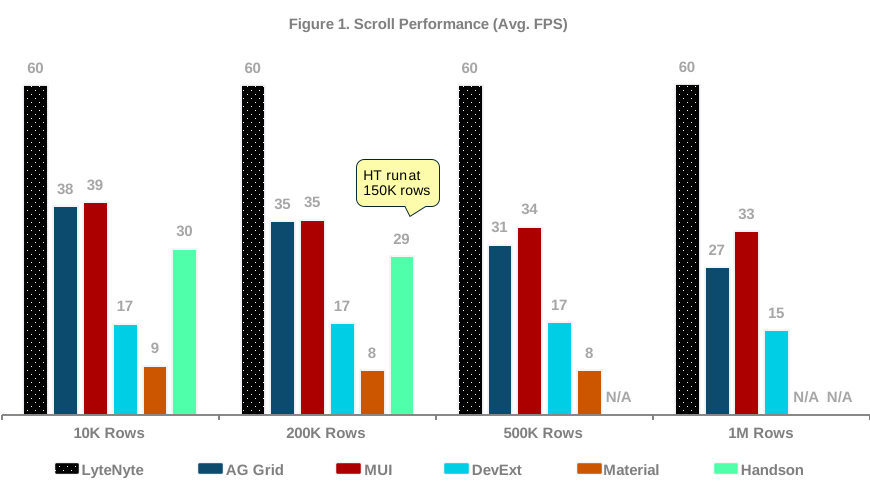
LyteNyte Grid was the only grid that maintained a consistent 60 FPS across all tested dataset sizes, including 1 million rows. MUI and AG Grid showed similar performance at smaller scales, but both experienced performance declines as dataset sizes increased.
At 1 million rows, MUI fell to 33 FPS, while AG Grid dropped to 27 FPS. At that scale, LyteNyte was ~80% faster than MUI, the next-fastest grid in the benchmark.
Handsontable completed tests up to approximately 150,000 rows but could not successfully run the larger benchmark scenarios on the test machine. DevExtreme prioritized consistency over raw performance, maintaining near 17 FPS across all dataset sizes. Material React Table reported the lowest average FPS among the grids tested.
Avg. FPS degradation measures the percentage drop in FPS as dataset size increases. Of the four grids that completed the 1 million-row benchmark, LyteNyte showed essentially no performance degradation.
MUI lost ~14% of its scrolling performance as dataset size increased. AG Grid showed the largest decline, dropping approximately 29%, from 38 FPS at 10,000 rows to 27 FPS at 1,000,000 rows.
For applications that handle large datasets, these differences translate directly into perceived responsiveness. At 60 FPS, scrolling remains smooth and fluid. At 27-33 FPS, frame drops become noticeable during rapid navigation, especially when multiple grids or other UI components are on screen simultaneously.
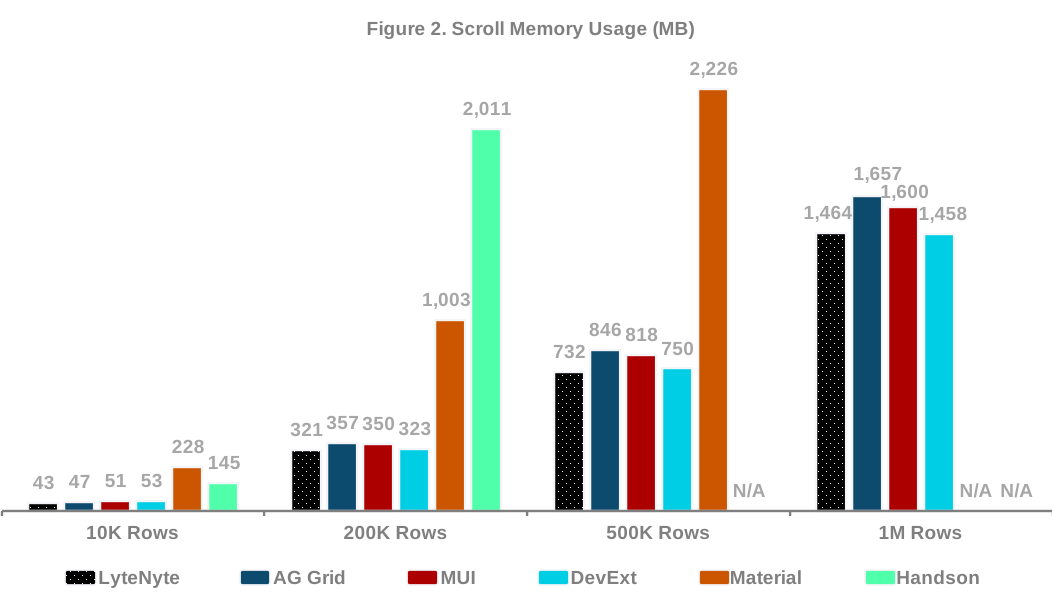
Memory usage increased across all grids as the dataset size grew, as expected. However, the achieved memory efficiency should be considered alongside the FPS output.
LyteNyte Grid and DevExtreme recorded the lowest memory footprints across all tested scales. However, LyteNyte maintained an average of 60 FPS, whereas DevExtreme averaged 16 FPS. This shows that both grids were memory- efficient at scale but delivered markedly different rendering performance.
This can be seen more clearly by assessing the performance ratio, which is the average FPS divided by memory (MB). A higher score indicates better optimization; this is essentially your “Bang-for-Your-Buck”.
| Scrolling Performance Ratio | LyteNyte | AG Grid | MUI | DevExt | Material | Handson |
|---|---|---|---|---|---|---|
| 10K Rows (Avg. FPS / MB) | 140.4% | 81.1% | 75.6% | 31.5% | 3.9% | 20.8% |
| 200K Rows (Avg. FPS / MB) | 18.7% | 9.9% | 10.1% | 5.2% | 0.8% | 1.4% |
| 500K Rows (Avg. FPS / MB) | 8.2% | 3.7% | 4.2% | 2.3% | 0.4% | N/A |
| 1M Rows (Avg. FPS / MB) | 4.1% | 1.6% | 2.1% | 1.1% | N/A | N/A |
DevExtreme used less memory than both AG Grid and MUI; however, its performance ratio was also lower. Handsontable and Material React Table showed different behavior, with memory usage increasing substantially as dataset size grew.
LyteNyte Grid, MUI, AG Grid, and DevExtreme all operate within a broadly comparable memory range at scale. The key difference is that LyteNyte Grid maintains 60 FPS while doing so.
Sort Performance
The following benchmarks evaluate sorting performance across three dataset sizes: 10,000, 50,000, and 100,000 rows.
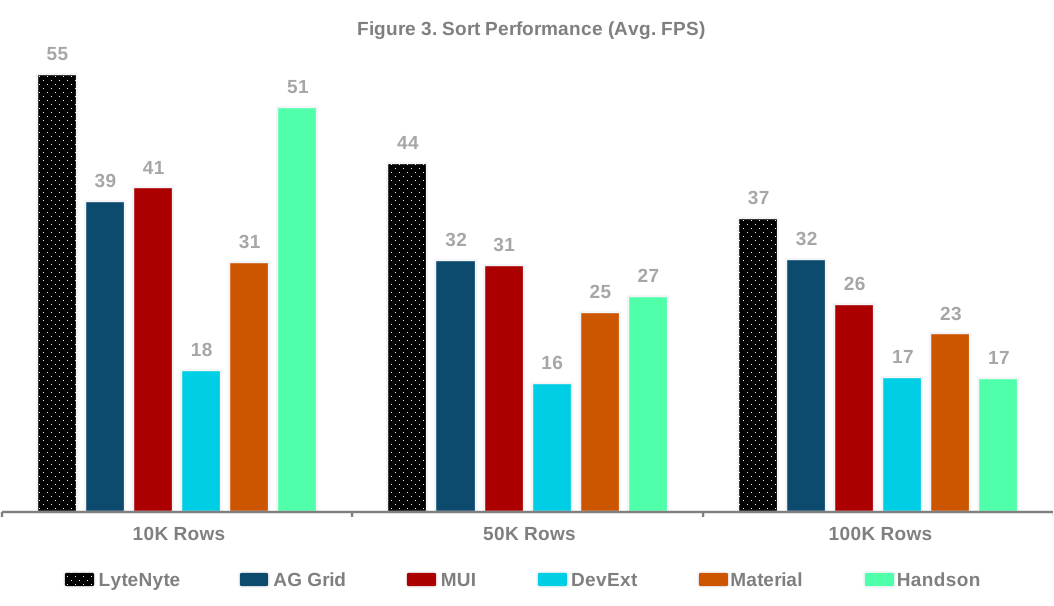
Sorting proved computationally expensive across every grid in the benchmark suite. No solution maintained 60 FPS throughout the sorting tests, but LyteNyte Grid consistently delivered the highest sorting performance across all dataset sizes.
Interestingly, AG Grid’s sorting performance remained nearly flat between 50,000 and 100,000 rows. Although its absolute performance stayed below LyteNyte Grid, AG Grid showed strong scaling characteristics during sorting operations.
Handsontable showed the steepest decline, falling from 51 FPS at 10,000 rows to just 17 FPS at 100,000 rows, a reduction of approximately two-thirds. DevExtreme remained the slowest performer overall, averaging between 18 and 16 FPS across the tested range.
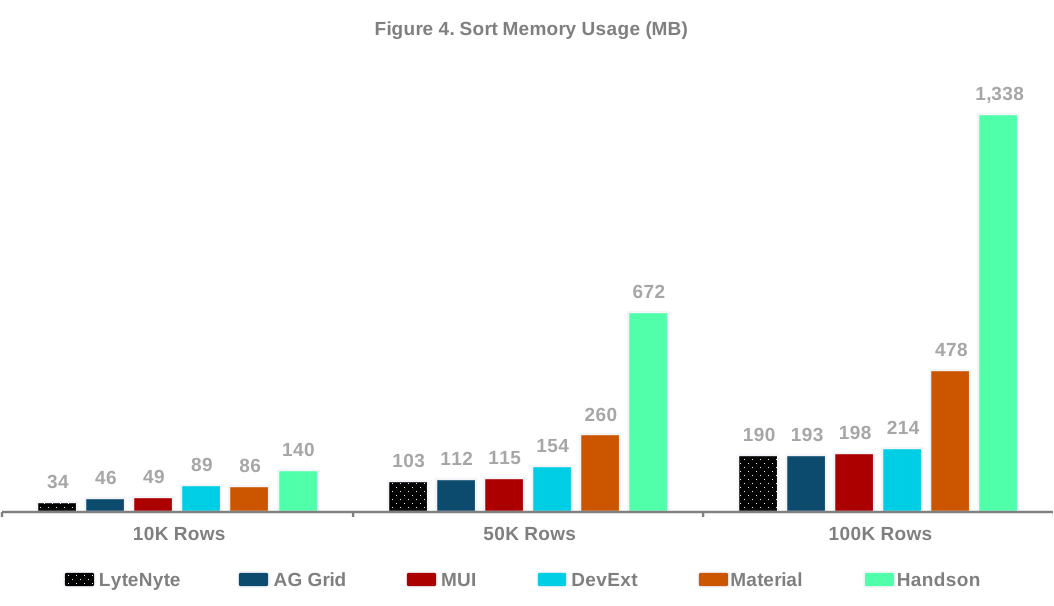
Memory usage during sorting was similar among the leading grids. LyteNyte consistently recorded the lowest memory consumption, but AG Grid and MUI stayed close enough that the practical difference between the three solutions is unlikely to be significant for most applications.
Handsontable was the clear outlier. It used substantially more memory than the other grids at every scale and showed the fastest memory growth as row counts increased.
| Sorting Performance Ratio | LyteNyte | AG Grid | MUI | DevExt | Material | Handson |
|---|---|---|---|---|---|---|
| 10K Rows (Avg. FPS / MB) | 162.9% | 84.6% | 84.3% | 20.1% | 36.5% | 36.6% |
| 50K Rows (Avg. FPS / MB) | 42.8% | 28.5% | 27.2% | 10.6% | 9.7% | 4.1% |
| 100K Rows (Avg. FPS / MB) | 19.5% | 16.6% | 13.2% | 7.9% | 4.7% | 1.3% |
DevExtreme’s results are noteworthy. Although it delivered the lowest FPS during sorting, its memory consumption remained relatively modest. This suggests that memory pressure was not the primary cause of its lower sorting performance.
Sorting performance is a more meaningful differentiator than memory consumption. LyteNyte Grid, AG Grid, and MUI all operated within a narrow memory range, but LyteNyte Grid consistently delivered higher sorting throughput.
Filter Performance
Filtering benchmarks measure how efficiently grids apply and clear filters while recalculating the rendered view.
The following benchmarks evaluate filtering performance across three dataset sizes: 10,000, 50,000, and 100,000 rows.
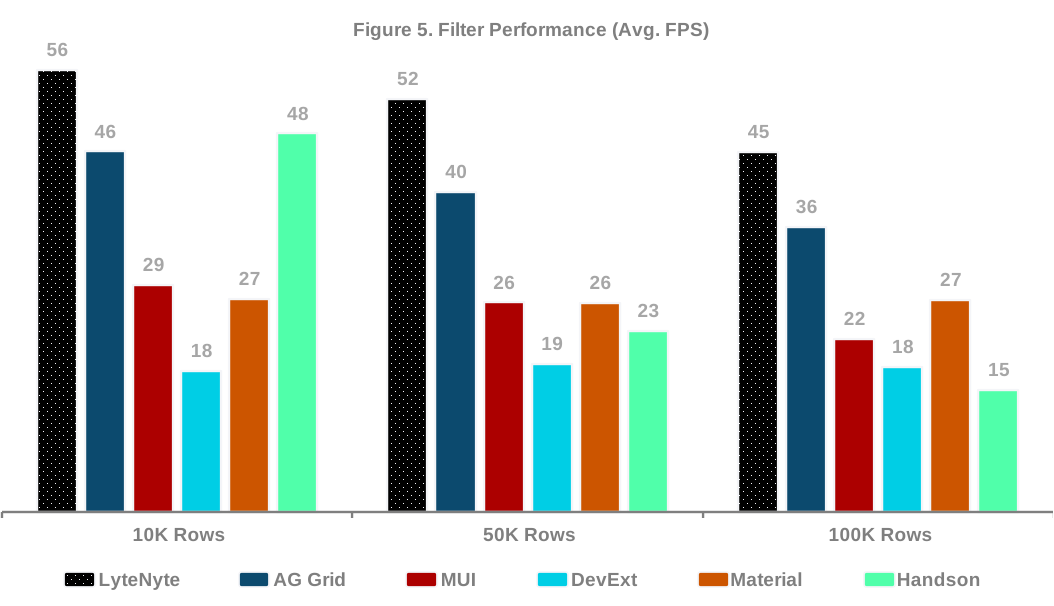
LyteNyte Grid delivered the strongest filtering performance across all tested dataset sizes, averaging 56 FPS at 10,000 rows and 45 FPS at 100,000 rows. AG Grid ranked second, achieving 46 FPS at 10,000 rows and 36 FPS at 100,000 rows.
Handsontable produced an unusual result. At 10,000 rows, it achieved the second-highest FPS among all grids tested. However, its performance declined sharply as the dataset size increased, making it the slowest grid in this test at 100,000 rows.
MUI performed noticeably worse during filtering than during sorting. Although MUI remained competitive, it trailed both LyteNyte and AG Grid across all dataset sizes.
DevExtreme again showed consistent performance as row counts increased, but its overall FPS remained substantially lower than the leading solutions.
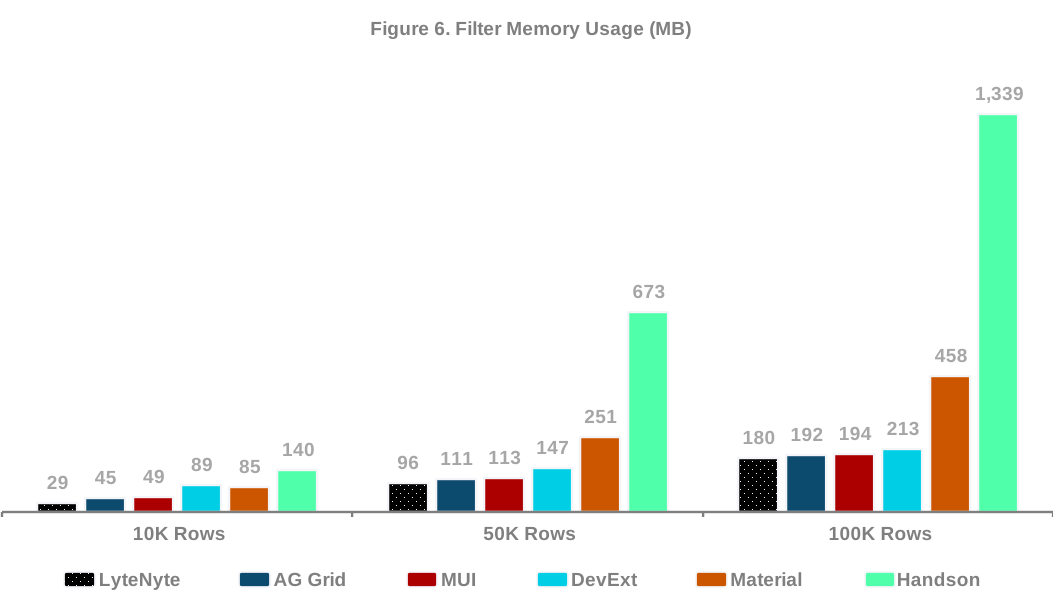
The memory results for filtering closely mirror those observed during sorting. LyteNyte recorded the lowest memory footprint across all dataset sizes, though the differences among LyteNyte, AG Grid, and MUI remained relatively small.
This suggests that memory consumption does not primarily explain the performance differences among the three leading grids. They used similar amounts of memory, yet their filtering performance differed considerably.
Handsontable was once again the clear outlier. It used the most memory and showed the fastest growth as the dataset size increased, consuming nearly 7 times more memory than LyteNyte Grid at 100,000 rows.
| Filtering Performance Ratio | LyteNyte | AG Grid | MUI | DevExt | Material | Handson |
|---|---|---|---|---|---|---|
| 10K Rows (Avg. FPS / MB) | 189.4% | 100.2% | 58.9% | 20.0% | 31.7% | 34.1% |
| 50K Rows (Avg. FPS / MB) | 54.3% | 36.5% | 23.4% | 12.8% | 10.5% | 3.4% |
| 100K Rows (Avg. FPS / MB) | 25.2% | 18.7% | 11.3% | 8.6% | 5.8% | 1.1% |
Overall, the filtering benchmarks reinforce a pattern that appears throughout the report: memory usage among the leading grids is broadly comparable, while performance differences are significantly more pronounced.
Pinned Rows, Cell Updates, & Horizontal Scroll Performance
Pinned rows and columns, horizontal scrolling, and large-scale data updates often expose architectural limitations that are not apparent during standard benchmark scenarios.
The following tests evaluate three common enterprise workloads:
- Scrolling with pinned rows and columns enabled.
- Horizontal scrolling with pinned content present.
- Full dataset replacement and update operations.
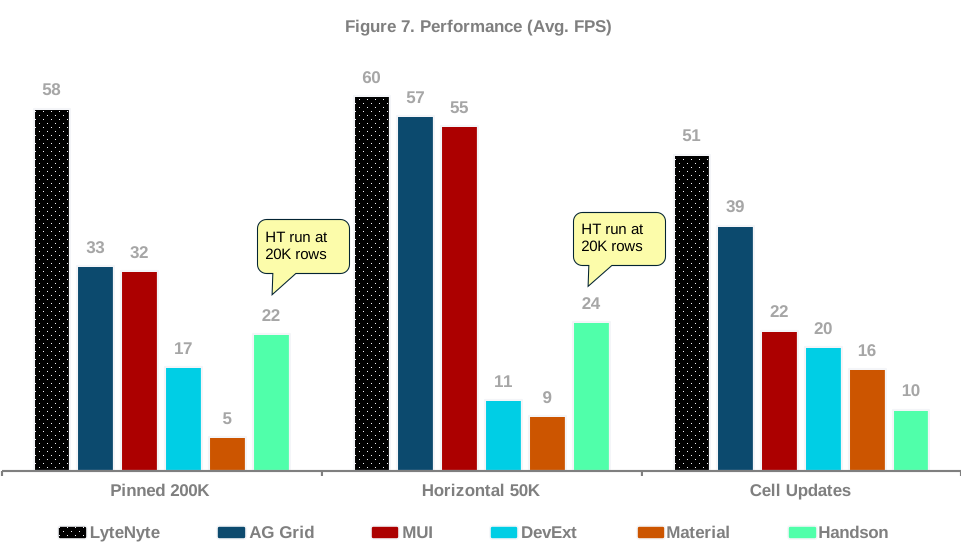
As with the previous tests, LyteNyte Grid delivered the highest FPS across all three benchmark scenarios.
Pinned Row Scrolling
Pinned rows and columns introduce additional layout work because multiple rendering regions must remain synchronized during scrolling.
LyteNyte maintained 58 FPS during the pinned-scrolling benchmark, remaining close to the 60 FPS threshold for smooth interaction.
Compared with the 200,000-row scrolling test without pinned rows and columns, most grids showed no material difference in FPS. Handsontable was the main exception, dropping from 29 FPS without pinned regions to 22 FPS with them.
Horizontal Scrolling
Horizontal virtualization proved less demanding overall. LyteNyte achieved 60 FPS, while AG Grid and MUI achieved 57 FPS and 55 FPS, respectively. The gap between the leading solutions is relatively small, indicating that all three grids have effective horizontal virtualization implementations.
The largest differences were observed among the lower-performing grids, with Material Table averaging only 9 FPS.
Cell Updates
Full dataset replacement was one of the most demanding operations in the benchmark suite. LyteNyte Grid achieved the highest performance at 51 FPS, followed by AG Grid at 39 FPS. MUI ranked third at 22 FPS, creating a clear gap between the top three performers.
LyteNyte Grid delivered approximately 29% higher dataset replacement performance than AG Grid and more than double MUI’s performance.
For applications that regularly replace or refresh large datasets, these differences can directly affect perceived responsiveness and update latency.
Scenarios Memory Usage
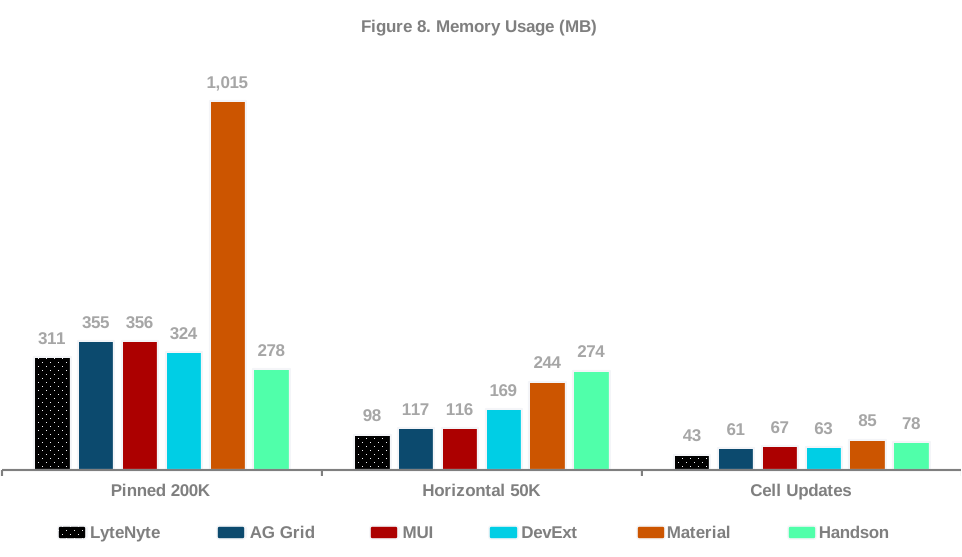
LyteNyte Grid recorded the lowest memory usage for horizontal scrolling and cell updates and the second-lowest memory usage for pinned rows.
Across these tests, memory differences among most grids were relatively small and unlikely to be meaningful for many applications. Material React Table was the main exception, particularly with pinned rows.
| Performance Ratio | LyteNyte | AG Grid | MUI | DevExt | Material | Handson |
|---|---|---|---|---|---|---|
| Pinned 200K | 18.7% | 9.2% | 9.0% | 5.1% | 0.5% | 7.9% |
| Horizontal 50K | 61.1% | 48.6% | 47.5% | 6.7% | 3.6% | 8.7% |
| Cell Updates | 116.9% | 63.9% | 33.4% | 31.3% | 19.3% | 12.5% |
A more useful view is to compare memory usage relative to performance. Based on the performance-to-memory ratios for these tests, LyteNyte Grid outperformed the peer set in every scenario. AG Grid ranked a clear second, followed by MUI.
Bundle Size Comparisons
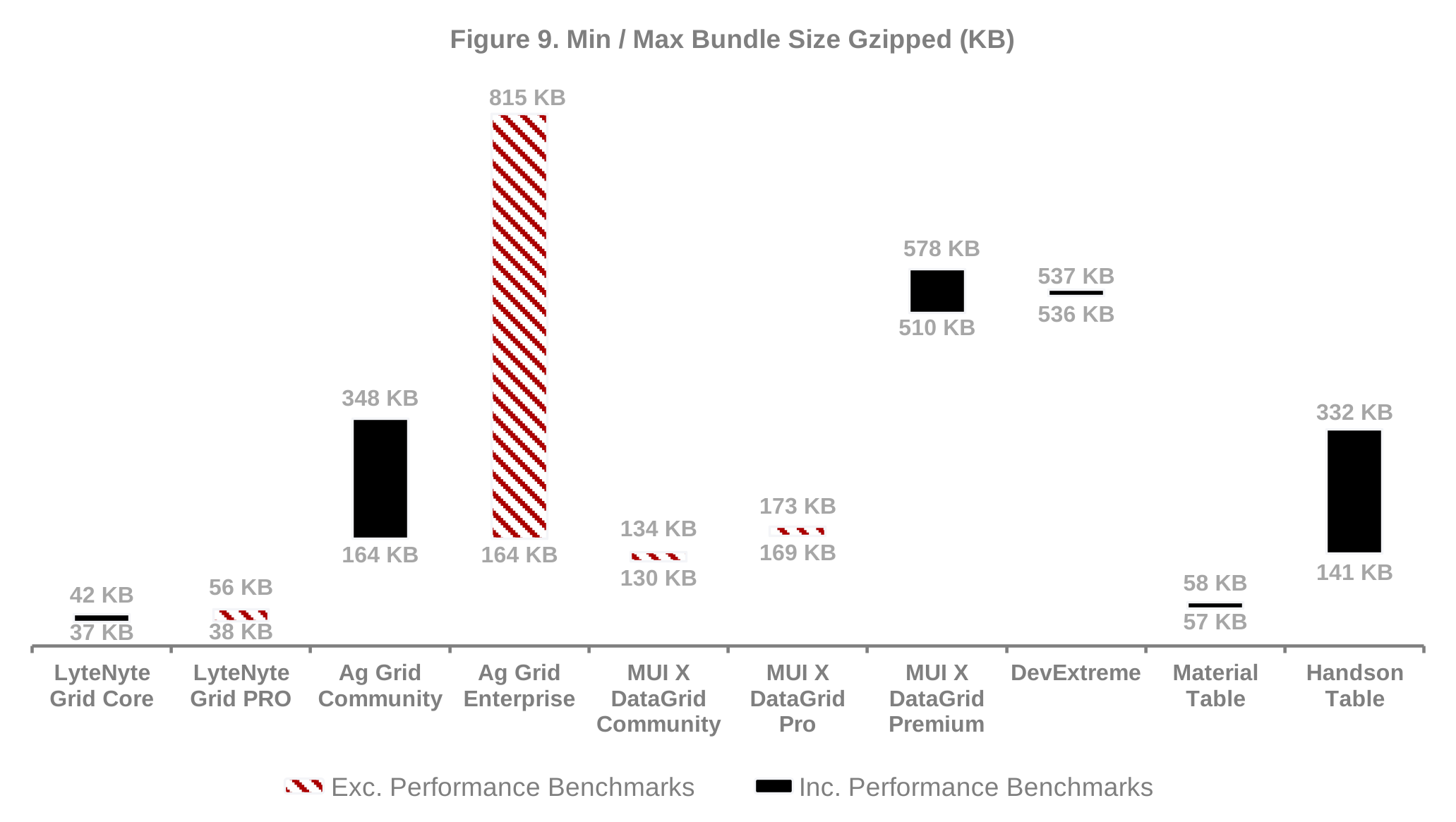
LyteNyte Grid has the lowest bundle size relative to the grids tested. Bundle size is important to ensuring that your application loads quickly even when connection speeds are low.
However, bundle size should be evaluated relative to the provided feature set. In our view, LyteNyte Grid is the most feature-rich data grid available, followed by AG Grid. Both offer a comprehensive feature set for most enterprise workflows.
The bundle sizes shown above should not be treated as a like-for-like comparison. The performance benchmarks evaluated the free versions of LyteNyte Grid and AG Grid, but used MUI X Data Grid Premium because MUI’s free version lacks the virtualization capabilities required for these tests.
The chart includes bundle sizes for the relevant versions of LyteNyte Grid, AG Grid, and MUI to provide additional context when comparing React data grid solutions.
Scope and Limitations
Performance is only one factor when selecting a data grid, and every solution in this comparison reflects significant engineering effort and years of development.
These results measure runtime performance characteristics and should not be used as a measure of overall product quality. Teams should also consider editing workflows, APIs, licensing models, ecosystem maturity, enterprise functionality, and feature completeness, none of which are reflected in the benchmark results.
Several additional considerations should be kept in mind when interpreting the results:
- Client-side only: All benchmarks run entirely in the browser. Server-side processing and backend-assisted optimizations are intentionally excluded.
- Configuration differences: Data grids expose different performance-related configuration options. Where possible, each grid was tested using its recommended performance settings.
- Programmatic scrolling: Scroll benchmarks use browser automation and programmatic scrolling rather than mouse-wheel or touch interactions. This approach is applied consistently across all grids.
- High-scale workloads: The benchmark scenarios are intentionally demanding, beginning at 10,000 rows and 300 columns. Results may differ for smaller or less data-intensive applications.
Developers are encouraged to reproduce the tests and evaluate the grids against their own requirements.
Conclusion
The benchmark results demonstrate meaningful differences in how modern data grids perform under demanding workloads.
Across scrolling, sorting, filtering, pinned layouts, and dataset updates, LyteNyte Grid consistently delivered the highest overall performance while maintaining one of the lowest memory footprints in the comparison.
The most significant performance advantage was observed in scrolling and virtualization benchmarks, where LyteNyte maintained a consistent 60 FPS even with one million rows. Strong results were also observed in sorting, filtering, pinned scrolling, and full dataset replacement.
Memory consumption across the leading grids was generally comparable, suggesting that the primary differentiator is not resource consumption alone but how efficiently those resources translate into rendering and interaction performance.
The right data grid ultimately depends on the needs of your application, users, and development team. However, if your application handles large datasets and virtualization performance is a priority, LyteNyte Grid stands out. Across these benchmarks, LyteNyte consistently delivered the strongest rendering and interaction performance, and its lead grew more pronounced as dataset size increased.
For teams building data-intensive React applications, LyteNyte Grid is designed to scale without sacrificing responsiveness.
Get Started Now
- Try the interactive demo. See LyteNyte Grid PRO in action.
- Compare license plans. Choose the right fit for your team.
Or start building with the free LyteNyte Grid Core edition. It’s open-source, memory-efficient, and ready to drop into your next React project
Disclaimer
This article and benchmark project are provided for informational purposes only. The article, benchmark methodology, scripts, and configuration are not an endorsement, recommendation, or guarantee of performance for any grid library. Results may vary based on hardware, browser version, operating system, system load, grid configuration, dataset shape, and application requirements.
All third-party names, packages, trademarks, and products referenced in this project belong to their respective owners. Their inclusion is for comparative benchmarking only and does not imply sponsorship, endorsement, affiliation, or approval.
We aim to configure each grid fairly and consistently. If you maintain one of the included grids and believe a benchmark configuration is incorrect or unrepresentative, please open an issue or pull request with details.
This project is provided “as is,” without warranties of any kind. Users should review the methodology, inspect the source code, and validate results in their own environment before making technical or business decisions.